Overline
Enrolment Information

Families who join St Carlo’s in our opening year are part of a unique founding community, helping to shape a school culture of faith, joy and service for generations to come. The choices we make together in these first years will leave a lasting imprint on every child who follows. As foundation families, your voice and involvement directly influence how our values are lived, how our facilities grow, and how our young people come to know themselves as loved by God and called to bring hope to others.
Enrolling in a Catholic Education Wilcannia-Forbes School
Go to the school’s website and click on the ENROL HERE button
Online enrolment is completed using Compass – our schools’ Student Management System.
- If this is the first time you are enrolling a child in a Catholic Education Wilcannia-Forbes school, as the child’s legal parent/guardian you will create a Compass Account and then add a Student Profile for your child. Follow the steps for FIRST TIME ENROLLING.
- If you already have at least one child enrolled in our school(s), you will log in to your existing Compass Account. You will need to add a Student Profile for an additional child. Follow the steps for ENROLLING A SIBLING.
- If you are moving a child from one of our schools to another, follow the steps for CHANGING SCHOOLS.The online application will save as you progress. You can return to complete the application in stages if needed.
Don’t worry – we’ll take you through the steps in the section below.
Have Your Documents Prepared
Ensure that you have all of the necessary documents ready (scanned or photographed) to upload as part of the online enrolment process. You will need the child’s:
- Birth certificate or identity documents
- Immunisation Certificate
As well as any of the following applicable documents:
- Baptismal Certificate ( if applicable)
- Copies of any family law or other relevant court orders
- Relevant medical information, including clinical/educational assessments
- All current assessments or records related to exceptional abilities, disability or complex social or emotional needs
- Copies of the most recent school reports (for enrolments other than Kindergarten)
If your child is not an Australian citizen, you will also need to provide:
- Child’s passport
- Visa grant notice
- Evidence of the Visa that the student has applied for (bridging visas)
.
First Time Enrolling
If you have never had a child enrolled in a Catholic Education Wilcannia-Forbes school, you will need to create a Compass Account before you can complete an online application. Follow the steps below.
STEP 1: Have Documents Ready (as outlined above)
STEP 2: Create a Compass Account
If you have never had a child enrolled in a Catholic Education Wilcannia-Forbes school, you will need to create a Compass Account. To create a new account CLICK HERE.
STEP 3: Set your Account Password
- Retrieve the registration email from the nominated email account that you used to set up your account. Don’t forget to check your ‘junk’ folder if you can’t see it in your inbox.
- This email will contain your new username and a temporary password.
STEP 4: Log in to the Compass Portal
- To log in to your new Compass Account, follow the link in the registration email and use your username and temporary password to sign in.
- You will be prompted to update your password.
- Set your unique password and select CHANGE PASSWORD.
- You will receive a message that your password has been successfully reset.
- Select CONTINUE TO ENROLMENTS
STEP 5: Create a New Student Profile
- Under the settings cog, select the ‘Family and Enrolments’.
- Click ‘Create a new student profile’. A student profile must be created for each student to be enrolled and will require the appropriate documentation to be uploaded.
- Follow the prompts to complete all mandatory fields and upload supporting documentation.
STEP 6: Create an Online Enrolment Application
- Follow the prompts to complete the enrolment application.
Enrolling a Sibling
If you already have one child enrolled in a Catholic Education Wilcannia-Forbes school, and would like to enrol another, follow the steps below.
STEP 1: Have Documents Ready
STEP 2: Create a New Student Profile
- Log in to your Compass account, using the Compass portal from your already-enrolled child’s school.
- Select the cog icon in the top right-hand corner.
- Scroll down to ‘Family and Enrolments’.
- Click ‘Create a new student profile’ for the sibling of your currently-enrolled child.
- Follow the prompts to complete all mandatory fields and upload supporting documentation.
Changing Schools
Sometimes circumstances change and you may need to move your child from one of our schools to another. If you wish to enrol your child in a different Wilcannia-Forbes school, please contact us for support.
School Fees
School Fees at St Carlo's
At St Carlo’s, our commitment is focused on providing a high quality and inclusive Catholic education.
Annual school fee accounts are sent out at the start of each year (or the start of enrolment) via email. A printed copy can be provided on request.
Arrangements can be made to pay in a lump sum, weekly, fortnightly or monthly.
Fees may be paid in cash at the school, or via electronic banking methods including BPAY, EFTPOS and Centrepay (fortnightly deducations from Centrelink payments)
Concessions
There may be circumstances that prevent the full payment of school fees. Please make contact with our finance department for a confidential discussion and the development of a payment plan.
Costs Not Covered by Fees and Levies
Costs that are year level specific (for example, representative sport travel and excursions) will be billed via Compass events and are to be paid when consent is given. Arrangements for payment plans can be arranged with the finance department if required.
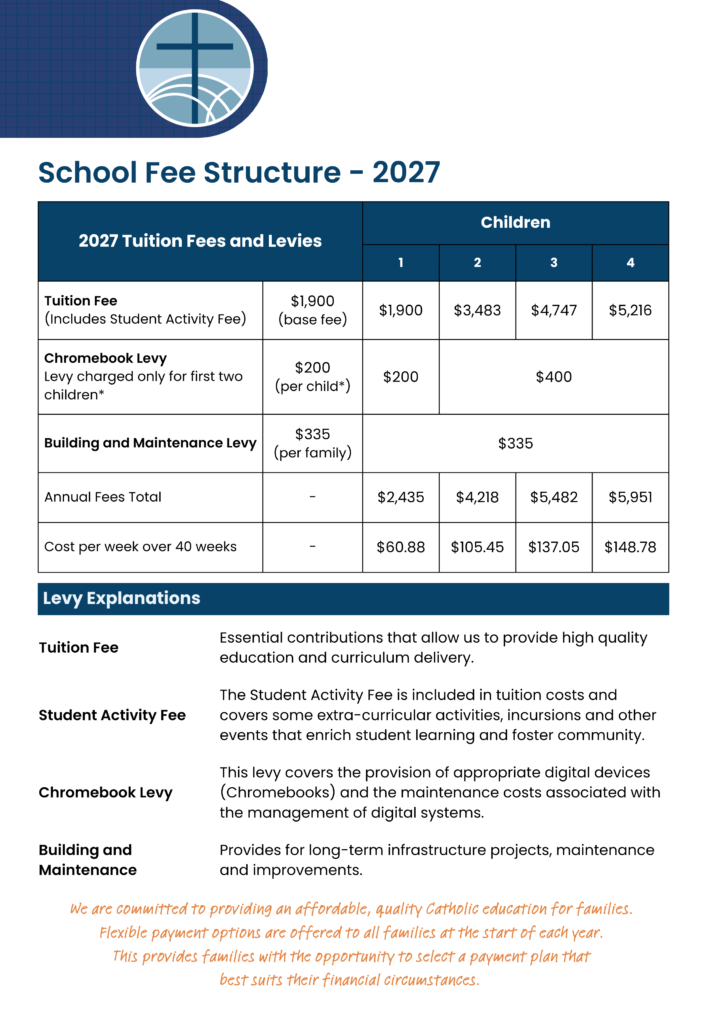
2027 Schedule of Fees
The full schedule of 2027 fees, including detailed breakdowns of tuition and levies, is shown in the table below.
© St Carlo's Catholic School. All rights reserved.